Friday, 12 November 2021

Data Network basics

1) Console port, Aux port, Managment port.

https://ipwithease.com/difference-between-console-port-and-management-port-in-networking-devices/

Console: Not have IP address, can see boot seq
Managment: will have IP address, boot seq can not be seen


A benefit of out-of-band management is if you screw up the network somehow, where you might lose connection to the switch if connecting via an in-band method, you continue to be able to manage the device.

From Cisco Document :

" The router includes an asynchronous serial console port and an auxiliary port. The console and auxiliary ports provide access to the router either locally using a console terminal connected to the console port, or remotely using a modem connected to the auxiliary port.
The main difference between the console and auxiliary ports is that the auxiliary port supports hardware flow control and the console port does not. Flow control paces the transmission of data between a sending device and a receiving device. Flow control ensures that the receiving device can absorb the data sent to it before the sending device sends more. When the buffers on the receiving device are full, a message is sent to the sending device to suspend transmission until the data in the buffers has been processed. Because the auxiliary port supports flow control, it is ideally suited for use with the high-speed transmissions of a modem. Console terminals send data at slower speeds than modems; therefore, the console port is ideally suited for use with console terminals. "

out-of-band management involves the use of a dedicated circuit  for managing network nodes. this means that data traffic and mangement traffic do not share the same circuit. in case of out-of-bound management, traffic flows within a network on which no production traffic resides.
in-band management means  traffic flows across  the enterprise production network  or the internet ( or both). date traffic and mangement traffic share the same channel
 
 
ND RA:
=====
 
https://community.arubanetworks.com/blogs/sumesh-murali1/2020/10/20/explain-the-m-and-o-bit-in-ipv6-dhcp-server-configuration-what-are-the-associated-flags
 
 
• ‘M’ bit - "Managed address configuration" flag. When set, it indicates that the client may use DHCPv6 to retrieve a Managed IPv6 address from a DHCPv6 server. If the M flag is set, the O flag is
redundant and can be ignored because DHCPv6 will return all available configuration information.
 
• ‘O’ bit -  "Other configuration" flag. When set , indicates that other configuration information is available via DHCPv6. Examples of such information are DNS-related information or information on other servers within the network.

When a router sends an RA with ‘O’ bit set, but does not set the ‘M’ bit, the client can do Stateless Address Autoconfiguration (SLAAC) to obtain its IPv6 address, and use DHCPv6 for obtaining additional information. (An example of additional information is DNS). This mechanism is well known as Stateless DHCPv6, because the DHCPv6 server does not need to keep track of the client address bindings.
 
Note: If neither M nor O flags are set, this indicates that no information is available via DHCPv6.


IP Cisco:
 
https://ipcisco.com/lesson/ipv6-ndp-neighbour-discovery-protocol/


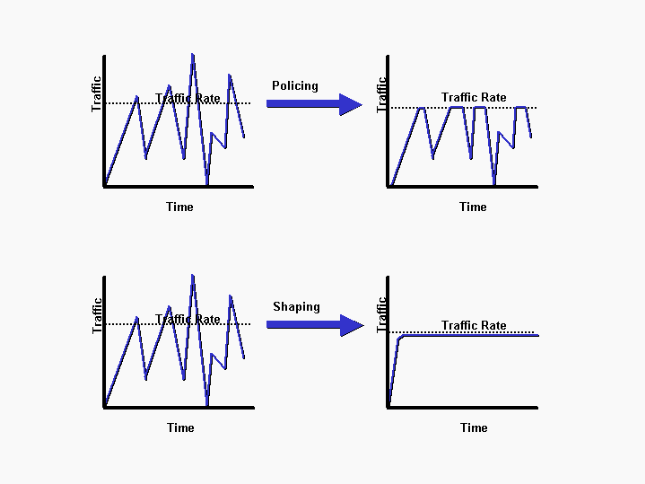
Shaping  & Policing:

https://www.cisco.com/c/en/us/support/docs/quality-of-service-qos/qos-policing/19645-policevsshape.html


ingress(Traffic from hardware to end device/CPE)/down link traffic:

egress (Traffic from CPE to Hardware)/UP link traffic:


https://www.cisco.com/c/dam/en/us/support/docs/quality-of-service-qos/qos-policing/19645-policevsshape-a.gif 
 
 
only egress/downlink traffic will have shapping/queing.
 
ingress/uplink traffic will not have shappers. only policying will be there. 

usually: Ingress---->Policers
              Egress--->Shappers


ND:

Wednesday, 3 November 2021

Cloud (Docker, Container, Kubernetes)

 Container:

    A lightweight and portable executable image that contains software and all of its dependencies

Cluster:
   A set of machines, called nodes, that run containerized applications managed by Kubernetes

PoD:0

A point of delivery/point-of-deployment, or PoD, is "a module of network, compute, storage, and application components that work together to deliver networking services. The PoD is a repeatable design pattern, and its components maximize the modularity, scalability, and manageability of data centers." [1]


Docker:


Docker is a software technology providing operating-system-level virtualization also known as containers.

 
kubernetes(k8s):


K8s:K eightcharacters(ubernete) s:

The REST API is the fundamental fabric of Kubernetes. All operations and communications between components.To write applications using the Kubernetes REST API, you do not need to implement the API calls and request/response types yourself. You can use a client library for the programming language you are using.


https://kubernetes.io/docs/reference/kubectl/docker-cli-to-kubectl/


"K3s": 

K8s is a general-purpose container orchestrator, while K3s is a purpose-built container orchestrator for running Kubernetes on bare-metal servers. Kubernetes uses kubelet, an agent running on each Kubernetes node to perform a control loop of the containers running on that node. This agent runs inside the container

Orchestrator:
 
HelmsMan:
 
HelmChart: 

Helm: This is steering or device used for ship/boat (
a tiller or wheel for steering a ship or boat).


Few Common Infra:

NATS and NATS Streaming:

KAFKA:


Cisco Contiv:


Kafka generally scales very well, so measuring the throughput of a single broker with a single producer and single consumer isn’t particularly meaningful. In reality, we’d be running a cluster with several brokers and partitioning our topics across them.
For as young as it is, NATS Streaming has solid performance (which shouldn’t come as much of a surprise considering the history of NATS itself), and I imagine it will only get better with time as the NATS team continues to optimize. In some ways, NATS Streaming bridges the gap between the commit log as made popular by Kafka and the conventional message queue as made popular by protocols like JMS, AMQP, STOMP, and the like.

https://blogs.cisco.com/cloud/why-contiv


Few Common DB:
Readb


REST API:


Docker vs. Virtual Machines

Docker is basically using the OS-level virtualization, Linux namespaces and control groups, for example. Its overhead is very thin compared to a virtualization technique, like Hypervisor used by virtual machines.


Docker is container based technology and containers are just user space of the operating system. At the low level, a container is just a set of processes that are isolated from the rest of the system, running from a distinct image that provides all files necessary to support the processes. It is built for running applications. In Docker, the containers running share the host OS kernel.

A Virtual Machine, on the other hand, is not based on container technology. They are made up of user space plus kernel space of an operating system. Under VMs, server hardware is virtualized. Each VM has Operating system (OS) & apps. It shares hardware resource from the host.

VMs & Docker – each comes with benefits and demerits. Under a VM environment, each workload needs a complete OS. But with a container environment, multiple workloads can run with 1 OS. The bigger the OS footprint, the more environment benefits from containers. With this, it brings further benefits like Reduced IT management resources, reduced size of snapshots, quicker spinning up apps, reduced & simplified security updates, less code to transfer, migrate and upload workloads.


Deep on Docker:


https://en.wikipedia.org/wiki/Docker_(software)

https://medium.com/@kasunmaduraeng/docker-namespace-and-cgroups-dece27c209c7


https://www.linux.com/news/understanding-and-securing-linux-namespaces/ 

https://en.wikipedia.org/wiki/Linux_namespaces


https://www.youtube.com/watch?v=fqMOX6JJhGo


Deep Kubernetes (K8s):

https://kubernetes.io/docs/concepts/overview/components/


DevOps:


https://searchitoperations.techtarget.com/definition/DevOps


Namespace:

https://www.toptal.com/linux/separation-anxiety-isolating-your-system-with-linux-namespaces

https://www.nginx.com/blog/what-are-namespaces-cgroups-how-do-they-work/

https://developers.redhat.com/blog/2018/10/22/introduction-to-linux-interfaces-for-virtual-networking#macvlan


 Docker Networking:


https://www.youtube.com/watch?v=j_UUnlVC2Ss

https://kodekloud.com/tutorials/

https://argus-sec.com/docker-networking-behind-the-scenes/ 


https://legacy.netdevconf.info/1.2/slides/oct7/01_ahern_microservice_net_vrf_on_host.pdf

https://people.kernel.org/dsahern/management-vrf-and-dns 


Linux VRF:


https://www.kernel.org/doc/html/latest/networking/vrf.html

https://www.ibm.com/docs/en/was-nd/9.0.5?topic=machines-aliasing-network-interface-card-loopback-device


https://wiki.linuxfoundation.org/networking/start 


Yaml basic:

 https://en.wikipedia.org/wiki/YAML


Json basic:


https://www.youtube.com/watch?v=nPciTVMIDU4

https://www.crio.do/blog/what-is-json/?utm_source=adwords&gclid=CjwKCAjwz5iMBhAEEiwAMEAwGJQBNKrkP_gpm1XHo2iBRrLzb5CUpy8f4q6CncSyiCqVVrRtILvauxoCDpEQAvD_BwE


asn.1 vs json reason and history

https://news.ycombinator.com/item?id=8871604 


Cloud Vs Cloud-Native


VPP
 

Friday, 2 October 2020

Linux Kernel and Threading

 Kernal and User Threads:

=================


https://cs.uns.edu.ar/~jechaiz/sosd/clases/extras/03-LinuxThreads%20and%20NPTL.pdf


https://www.cs.cmu.edu/afs/cs/academic/class/15492-f07/www/pthreads.html


https://man.cx/pthread_setattr_default_np(3)#heading2


https://bootlin.com/doc/training/linux-kernel/linux-kernel-slides.pdf